
Python Wait: 7 Ways to Pause, Poll and Time Out Correctly
How to wait in Python: time.sleep, Event.wait, asyncio.sleep, wait_for, Popen.wait, polling with backoff, and Selenium explicit waits, with a comparison table.
- Written by
- Gautam Agarwal
- Read time
- 8 min read
- Published

Waiting in Python means pausing execution until a fixed time passes or a condition becomes true, using tools such as time.sleep(), threading.Event.wait(), asyncio.sleep() or a polling loop with a timeout. The right choice depends on what you are waiting for as much as how long.
Most tutorials stop at time.sleep(). That works for a script that pauses between API calls, yet it is the wrong tool for waiting on a thread, an async task, a child process or a web page. A fixed sleep either wastes time or ends too early, and in automated tests that difference becomes a flaky build.
This guide covers seven waiting techniques, when to use each, a reusable polling helper with backoff, and the waits that matter for browser tests.
Key Takeaways
time.sleep()suspends the calling thread and accepts fractions of a second, though the pause can run longer than requested.threading.Event.wait(timeout)returns as soon as another thread sets the event, instead of sleeping for a fixed period.asyncio.sleep()pauses only the current task, whileasyncio.wait_for()adds a timeout to any awaitable.subprocess.Popen.wait(timeout)raisesTimeoutExpiredif the child process runs past the limit.- Selenium's docs warn against mixing implicit and explicit waits, which can turn a 15-second wait into 20 seconds.
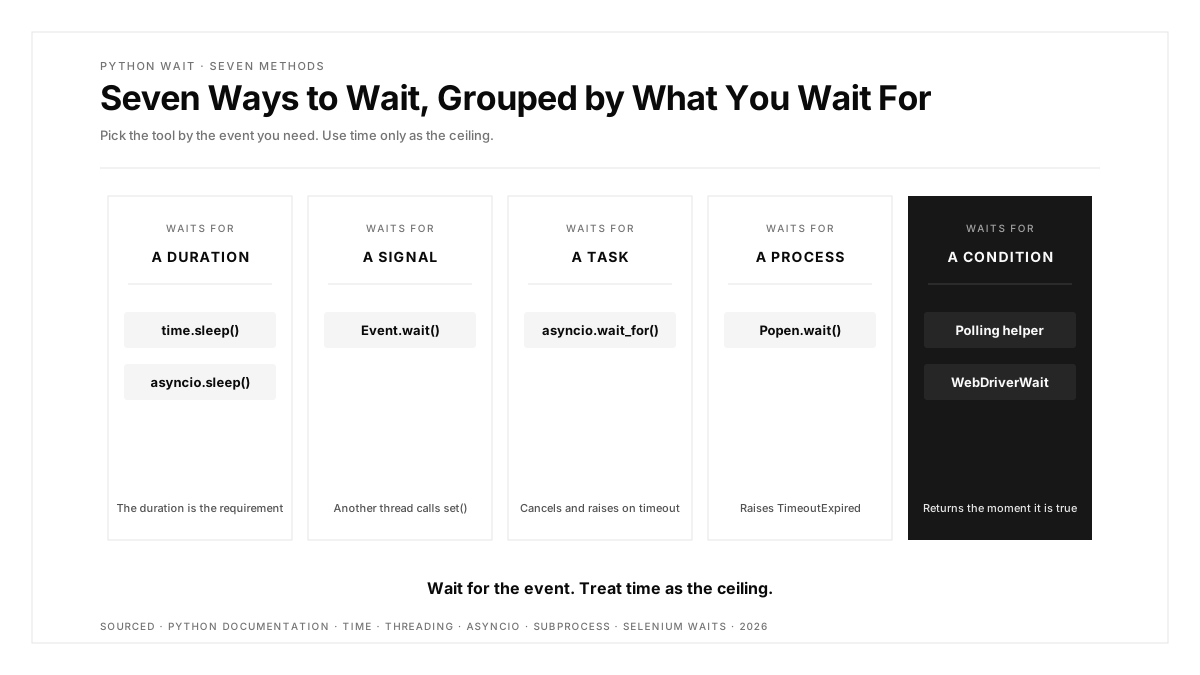
The Seven Ways to Wait, Compared
| Method | Waits for | Blocks | Has timeout | Best for |
|---|---|---|---|---|
time.sleep() | A fixed duration | The current thread | It is the duration | Simple pauses, rate limiting |
threading.Event.wait() | A signal from another thread | The current thread | Yes | Coordinating threads |
asyncio.sleep() | A fixed duration | Only the current task | It is the duration | Async code |
asyncio.wait_for() | Any awaitable to finish | Only the current task | Yes | Async calls that might hang |
subprocess.Popen.wait() | A child process to exit | The current thread | Yes | Running external commands |
| Polling loop with backoff | Any condition you can check | The current thread | Yes | Files, jobs, eventual consistency |
Selenium WebDriverWait | A browser condition | The current thread | Yes | Browser tests |
The rule behind the table: wait for the condition, and use time only as the ceiling.
1. time.sleep(): Pause for a Fixed Time
import time

for page in range(1, 4):
    fetch_page(page)
    time.sleep(0.5)  # stay under the API's rate limit
The Python time module documentation describes time.sleep() as suspending the calling thread for the given number of seconds, with fractional values allowed for finer precision. It also notes the suspension can be longer than requested because of other activity on the system. Use it when the duration itself is the requirement, such as a rate limit, and avoid it when you are really waiting for something to happen.
2. threading.Event.wait(): Wait for a Signal
import threading

ready = threading.Event()

def worker():
    load_model()
    ready.set()

threading.Thread(target=worker).start()

if ready.wait(timeout=30):
    print("Model loaded")
else:
    print("Timed out after 30 seconds")
wait() returns True the moment another thread calls set(), and False if the timeout passes first. The program reacts as soon as the work finishes, rather than after a guessed delay.
3. asyncio.sleep(): Pause One Task, Keep the Rest Running
import asyncio

async def heartbeat():
    while True:
        send_ping()
        await asyncio.sleep(10)
Inside async code, time.sleep() would freeze every task on the event loop. await asyncio.sleep() pauses only the current task, so other coroutines keep running.
4. asyncio.wait_for(): Put a Ceiling on Async Work
import asyncio

async def main():
    try:
        data = await asyncio.wait_for(fetch_report(), timeout=5)
    except TimeoutError:
        data = None  # fall back to a cached report
asyncio.wait_for() waits for an awaitable with a timeout. If the timeout hits, it cancels the task and raises TimeoutError, which keeps one slow dependency from stalling a whole service.
5. subprocess.Popen.wait(): Wait for a Child Process
import subprocess

proc = subprocess.Popen(["pytest", "-q"])
try:
    code = proc.wait(timeout=600)
except subprocess.TimeoutExpired:
    proc.kill()
    code = proc.wait()
Popen.wait() blocks until the child exits and returns its exit code, or raises TimeoutExpired when the timeout passes. The Python docs also warn that wait() can deadlock when you pipe stdout or stderr and the child fills the pipe buffer; use communicate() in that case.
6. A Polling Helper With Timeout and Backoff
Many real waits lack a built-in signal: a file appearing, a background job finishing, a record becoming visible in a replicated database. A small helper covers all of them:
import time

def wait_until(check, timeout=30, interval=0.5, max_interval=5):
    """Call check() until it returns a truthy value or timeout seconds pass."""
    deadline = time.monotonic() + timeout
    while True:
        result = check()
        if result:
            return result
        if time.monotonic() >= deadline:
            raise TimeoutError(f"condition still false after {timeout}s")
        time.sleep(interval)
        interval = min(interval * 2, max_interval)  # exponential backoff

job = wait_until(lambda: get_job("1234").status == "done", timeout=120)
Three details make it dependable. time.monotonic() is immune to system clock changes. The interval doubles up to a cap, which keeps load on the system low during long waits. And the error message says what failed, which saves time when a CI run times out. This is the same pattern used when testing asynchronous APIs, covered in our guide to API testing strategies. The same idea underpins closed-loop verification, where a test waits for the stored state rather than trusting the first screen that looks right.
7. Waiting in Selenium Tests
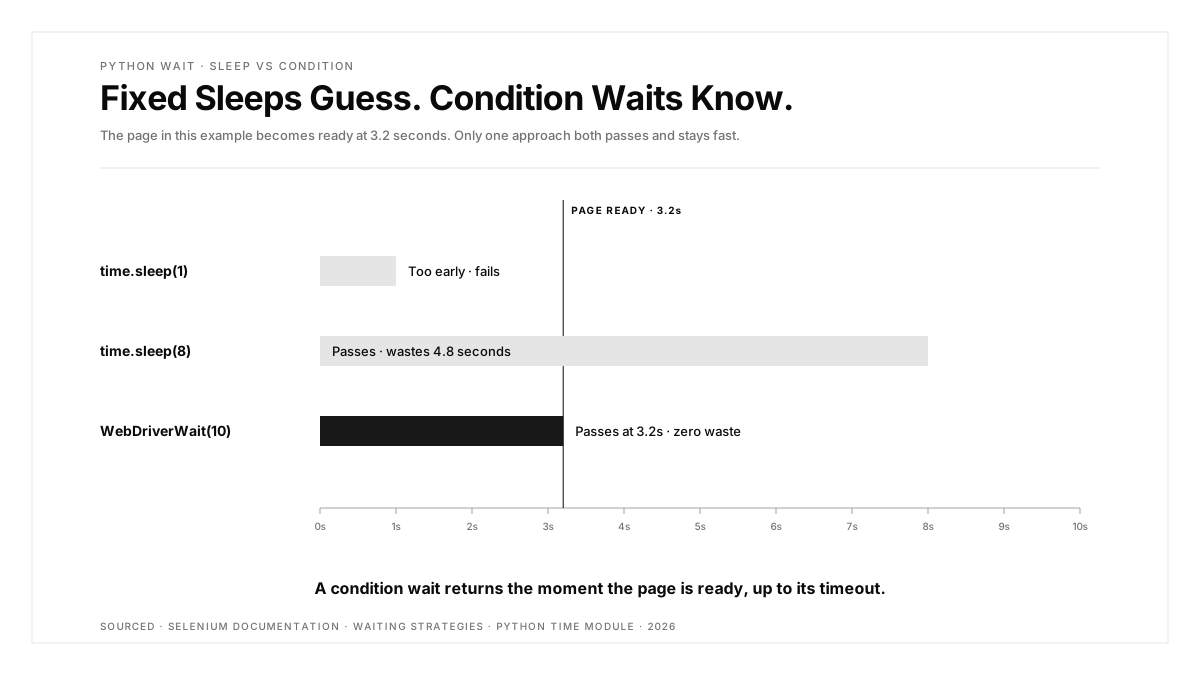
Browser tests are where fixed sleeps cause the most damage. The calls race conditions between test code and the browser one of the primary causes of flaky tests, and offers two mechanisms:
from selenium.webdriver.common.by import By
from selenium.webdriver.support.ui import WebDriverWait
from selenium.webdriver.support import expected_conditions as EC

button = WebDriverWait(driver, 10).until(
    EC.element_to_be_clickable((By.CSS_SELECTOR, "[data-test=checkout]"))
)
button.click()
| Wait type | Scope | Recommendation |
|---|---|---|
| Implicit wait | Global, applies to every element lookup | Keep it at zero if you use explicit waits |
| Explicit wait | One condition at one point in the test | The default choice for dynamic pages |
The Selenium docs give a sharp example of why the two should stay separate: a 10-second implicit wait combined with a 15-second explicit wait can time out after 20 seconds. Our guide to Selenium testing covers waits in the context of a full suite.
If you write browser tests in Python with Playwright, actions and web-first assertions wait automatically, so explicit sleeps become redundant.
Waiting Mistakes to Watch For
- Sleeping inside async code.
time.sleep()in a coroutine freezes the event loop; useawait asyncio.sleep(). - Waits with an infinite ceiling.
Event.wait()andPopen.wait()block forever when called with the default timeout; pass one explicitly. - Measuring timeouts with
time.time(). A clock change mid-wait can shorten or stretch it;time.monotonic()avoids that. - Swallowing timeouts. Catching
TimeoutErrorand continuing hides the real failure; log what you waited for and re-raise. - Tuning sleeps until CI passes. A sleep that passes today fails on a slower runner tomorrow; replace it with a condition.
Choosing the Right Wait
- The duration itself matters, such as a rate limit:
time.sleep(). - Another thread will signal you:
threading.Event.wait(). - You are inside async code:
asyncio.sleep()for pauses,asyncio.wait_for()for ceilings. - You started a process:
Popen.wait(timeout=...). - You can check a condition repeatedly: a polling helper with backoff.
- You are testing a browser: explicit waits in Selenium, or Playwright's built-in waiting.
Whatever the method, every wait in production code or CI should have a timeout and an error message that names the condition. When a wait fails in CI, our guide to fixing flaky tests in GitHub Actions helps separate timing problems from real defects.
Conclusion
Waiting well in Python comes down to one principle: wait for the event, and treat time as the ceiling. time.sleep() is right when the duration is the requirement. For everything else, Python offers a better tool: Event.wait() for threads, asyncio.sleep() and wait_for() for async code, Popen.wait() for processes, a polling helper for everything else, and explicit waits for browser tests.
For test suites that span web and mobile, the same principle applies on every surface. Our platform page shows how one flow can run across iOS, Android, the web, Chrome extensions and App Clips.
FAQs
How do I make Python wait for 5 seconds?
Call time.sleep(5) after importing the time module, or await asyncio.sleep(5) inside async code.
What is the difference between time.sleep and asyncio.sleep?
time.sleep blocks the whole thread, while asyncio.sleep pauses only the current task and lets others run.
How do I wait for a condition in Python?
Poll the condition in a loop with time.sleep between checks, a timeout, and an error when it expires.
How do I add a timeout to a wait in Python?
Use Event.wait(timeout), asyncio.wait_for(), Popen.wait(timeout) or a monotonic deadline in a polling loop.
What is an explicit wait in Selenium Python?
An explicit wait uses WebDriverWait to poll for one specific condition, such as an element becoming clickable.
Should I use time.sleep in tests?
Prefer condition-based waits in tests, since fixed sleeps either waste time or end before the page is ready.